The problem
Invoices arrive by email in every shape: a PDF, a few lines in the message, a reply on an old thread, another language. Each one has to be read, checked and logged.
Anything that fails a check has to land where a person will see it, with the reason.
- Nothing invented
- No bill lost quietly
What I asked first
The brief left these open. I answered each one in the workflow itself.
- What counts as an invoice? A request to pay for work already done, with an amount due. Not a quote, a receipt for a payment already made, or a request to change bank details.
- What if a field isn't in the email? It stays empty. A plausible guess is worse than a blank, and every value must appear in the email it came from.
- What if the same invoice arrives twice? Same vendor, number and total is a duplicate. The same number with a new total is a correction, and it's kept.
- What about replies and forwards? Quoted replies are stripped first, so a field never comes from an older invoice sitting underneath.
- Which formats and languages? European and UK amounts, dates left empty when they're ambiguous, any currency but never a default, and invoices in other languages.
- When does an email start costing money? Only once it looks like an invoice. Cheap checks run first, and a re-run of the same email makes no AI call.
How it runs
- Start
- Tool
- Check
- AI
- Result
- Error
01, Trigger:
An email arrives
Gmail
Obvious non-invoices stop here.
- Gmail Trigger
- Normalise & Prefilter
- Invoice Candidate?
- Stop: Not A Candidate
02, Step:
Read the invoice text
PDF or email body
No readable text? No AI call.
- Has PDF Attachment?
- Extract PDF Text
- Attach PDF Text
- Use Email Body
- Text Quality Gate
- Text Usable?
03, Logic:
Seen it before?
Google Sheets
Each email is handled once.
- Read Processed IDs
- Decide: Already Seen
- Already Processed?
- Stop: Already Processed
04, AI:
Classify and extract
Claude Haiku 4.5
Is it an invoice, and what does it say?
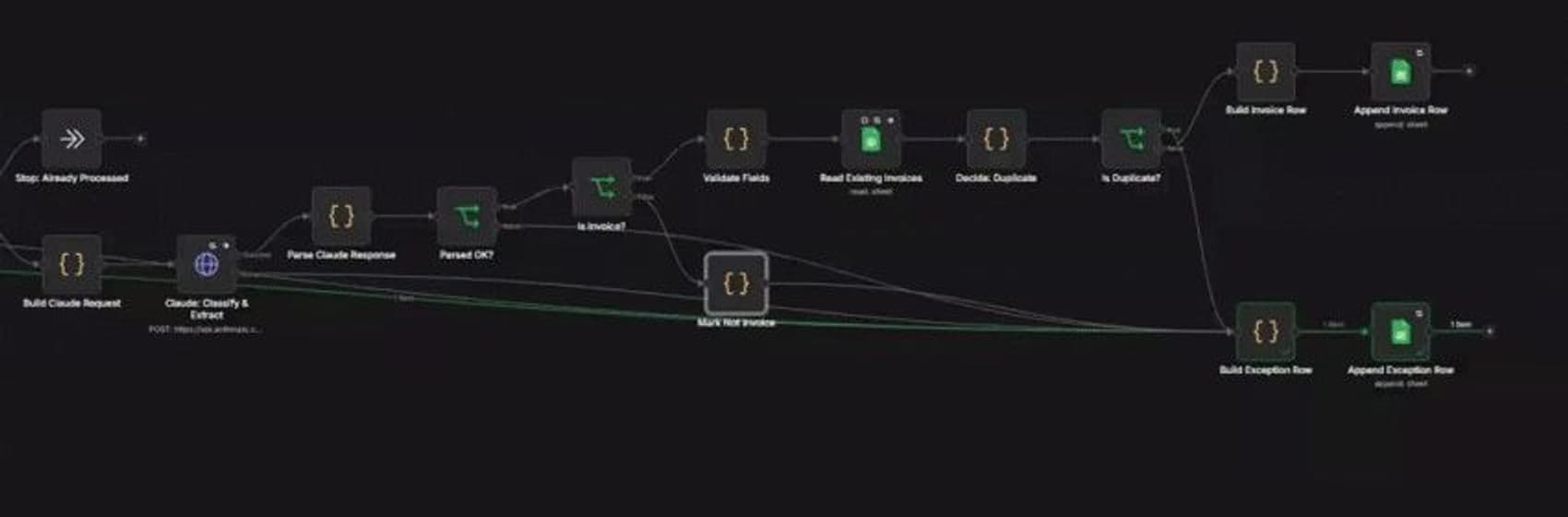
- Build Claude Request
- Claude: Classify & Extract
- Parse Claude Response
- Parsed OK?
- Is Invoice?
- Mark Not Invoice
05, Logic:
Check it
Code
Fields checked, duplicates caught.
- Validate Fields
- Read Existing Invoices
- Decide: Duplicate
- Is Duplicate?
Then: step 6; step 7 (fails a check).
06, Output:
Log the invoice
Google Sheets
Clean invoices only.
- Build Invoice Row
- Append Invoice Row
07, Error:
Log the exception
Google Sheets
Anything that fails a check, with the reason.
- Build Exception Row
- Append Exception Row
Enforced, not requested
- Nothing invented An invoice number that isn't in the email is rejected, not logged.
- Unreadable PDFs never reach the model A scan with no real text is flagged before any AI call.
- No AI cost until it looks like an invoice Invoice words or a PDF, checked first, for free.
- Each email once A re-run stops before the model, so it costs nothing.
- A correction isn't a duplicate Same number and total is a duplicate. A new total is kept.
- No default currency If the email doesn't say, the currency stays empty for a person.
- A cut-off answer isn't trusted If the model's reply is cut short, it goes to Exceptions.
- Every failure has a reason One Exceptions row per problem, labelled, with enough to act on.
The thing that nearly got past me
Incident
A scanned invoice logged as "not an invoice"
My first text check only asked how much text came back. A scanned PDF can carry a text layer that's nothing but a link, and that passed. The model read the link, found no invoice, and said so. A real bill would have disappeared without anyone seeing it.
The fixThe check now asks whether the text looks like a document: real words once links are removed, and numbers. And if a PDF gave up little text and the model says it isn't an invoice, it's logged as unread, for a person to check.
In numbers
10
emails in the test pack
8
cases the test pack covers
0
AI calls when the same email runs again. It stops before the model.
12
invoice words in English, French, Dutch and German, checked before any AI cost
6
named reasons an email can land on Exceptions
From the test pack and the workflow itself.
What it refuses to do
- Invent a value A missing field stays empty.
- Send an unreadable PDF to the model It's flagged first.
- Log a duplicate as a new invoice Duplicates go to the Exceptions tab.
- Read fields from an older email Quoted replies and forwards are stripped first.
What I took from it
A plausible guess is worse than a blank. Nothing downstream can tell a real invoice number from a made-up one.
The limit I'd fix first
if I did it again
- Scanned invoices need OCR. A scan has no text to read, so it goes to Exceptions for a person.
- One invoice per email. An email carrying several invoices only has its first PDF read.
Check it yourself
- Walkthrough video (opens in a new tab)
- Workflow fileStructure only. Credentials and settings removed.